Series: Git of the day
A series of Git tips and tricks.
-
Git of the day #14: git reset --keep HEAD^
Created a branch off the wrong place, but started working on changes? Keep changes while resetting a feature branch to a different place using the keep option.
-
Git of the day #13: git reset --soft HEAD^
Undo a git commit, without undoing the git add that staged the changes for the commit in the first place, keeping the working copy unchanged.
-
Git of the day #12: git checkout ref file
Restore a file to its state as it was in a previous or different commit.
-
Git of the day #11: git log --follow
Track file and folder moves when providing a path to git-log.
-
Git of the day #10: git add :/path/to/file
Specify a path relative to the root of the repository regardless of the current directory.
-
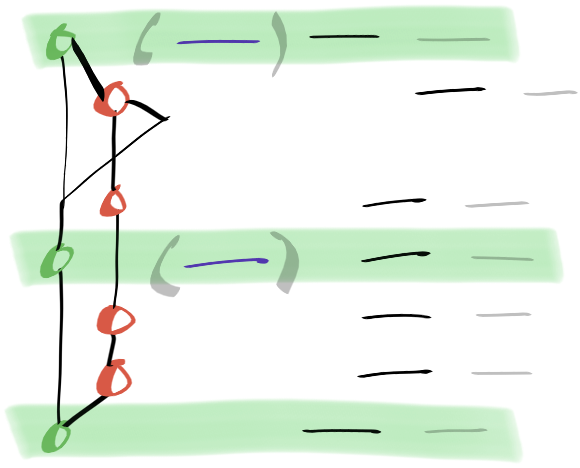
Git of the day #9: git log --first-parent
Show only ancestor commits that are the first parent of each commit in the tree.
-
Git of the day #8: git mv
Help Git update tracked changes on renamed and moved files, such as when changing the case of a filename.
-
Git of the day #7: git add --intent-to-add
Make Git aware of a new untracked file without staging its contents and adding it to the index.
-
Git of the day #6: git reset --hard ORIG_HEAD
Use ORIG_HEAD ref to reset HEAD back to the state before a rebase took place.
-
Git of the day #5: git rebase --interactive
Git history tells a story. Tell the best story you can using rebase.
-

Git of the day #4: git log --oneline --graph
A shorter log format with a fancy graph to show commit hierarchy clearly.
-
Git of the day #3: git add --patch
Begin an interactive session of adding hunks to the staging area,
-

Git of the day #2: git add --interactive
Start an interactive session with Git in the terminal.
-

Git of the day #1: git commit --amend --no-edit
Don't keep creating new commits to fix things in previous commits on your feature branch. The last commit can be edited with your staged changes.